
How to Create Collections in Shopify: A Complete Guide

Building a high performing online store is more than uploading products or adding prices. If you want customers to quickly find what they need and move from browsing to buying, your catalog must be organized with purpose and strategy.
Knowing how to create collections in Shopify, and using them the right way, is what separates a messy storefront from a polished, conversion driven experience. This guide will walk you through what collections are, how to set them up correctly, and the practical tactics that turn them into powerful tools for boosting sales.
What Is a Shopify Collection Page?
A Shopify collection page is more than just a group of products. Knowing how to create collections in Shopify allows you to design a curated space that organizes related items much like an aisle in a supermarket or a department in a clothing store. Instead of making shoppers scroll through a disorganized list, well-structured collections bring clarity, hierarchy, and purpose to your store.

Think of collections as the backbone of your site’s navigation. They help customers explore products by category, style, purpose, or theme such as "Shirts," "Modern," "Running," or "Summer 2024."
A well-designed collection page also shapes the browsing experience. Often the first page a visitor sees after clicking an ad or menu item, it guides them with clean layouts, clear messaging, and easy discovery, turning intent like "I want a lamp" into action such as "I will buy the Modern Desk Lamp."
How to Create a Collection on Shopify: A Step by Step Guide
Creating collections in Shopify is a straightforward technical process, but executing it the right way ensures your store stays organized and scalable as you grow.
Step 1: Go to Your Shopify Admin
The process begins in your dashboard.
- Log in to your Shopify store.
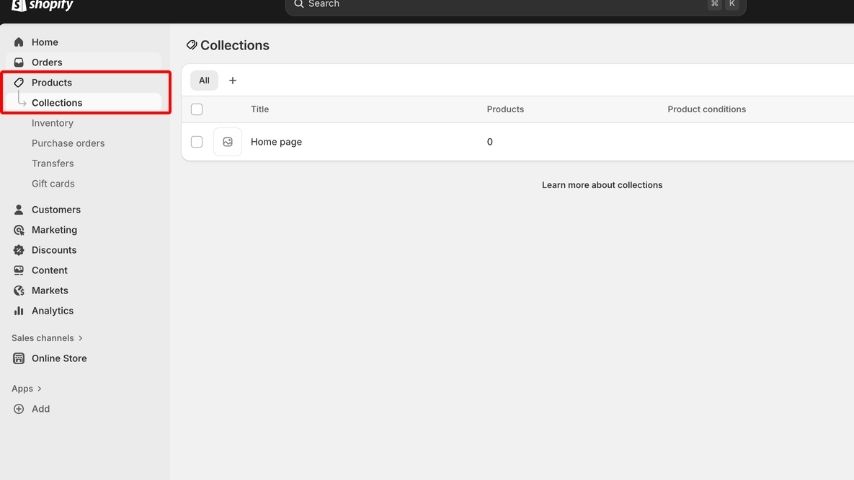
- Navigate to Products in the left hand sidebar.
- Select Collections.
- Click the Create collection button in the top right corner.
Step 2: Enter Your Collection Details
This is where you define the identity of the collection.
- Collection Title: Enter the name of your category.
- Description: Write your SEO friendly, persuasive text.
- Featured Image (Optional): Upload a banner image if your theme supports it.
- SEO Elements: At the bottom of the page, edit the "Search engine listing preview" to customize the URL handle and meta description.
Tip: Aim for clarity and keyword relevance in all these fields without engaging in "keyword stuffing" (over optimization).
Step 3: Choose Your Collection Type
This is the most critical technical decision. Shopify offers two distinct models for populating products:
A. Manual Collection
In a manual collection, you handpick each product individually.
- How it works: You search for a product and add it to the list. It stays there until you remove it.
- Best for: Highly curated, editorial style collections. Examples include "Staff Picks," "Flash Sale Items," or a small "Mother's Day Gift Guide." It gives you total control over the order and exact contents.
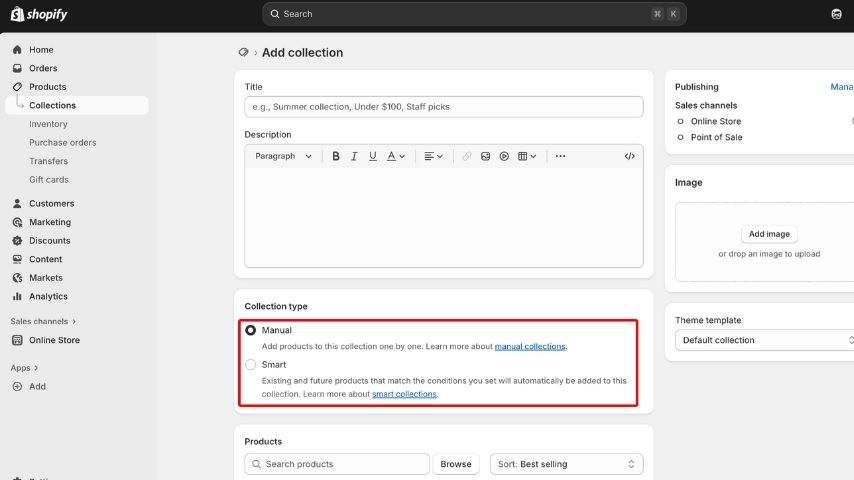
B. Automated Collection
In an automated collection, products are included automatically when they meet certain conditions you define.
- How it works: You set logic based rules.
- Best for: Stores with large or constantly expanding inventories. It saves massive amounts of time on data entry.
Step 4: Add Your Products (Setting Conditions)
If you chose Manual, you simply search for products and add them one by one.
If you chose Automated, you must set the logic. You can base these rules on:
- Product Tags: e.g., Tag equals "summer".
- Price: e.g., Price is greater than $20.
- Vendor: e.g., Vendor equals "Nike".
- Product Type: e.g., Type equals "T Shirt".
You can set the logic to require products to match all conditions (AND logic) or any condition (OR logic). For example, creating a "Summer Sale" collection might include products tagged "Summer" AND priced under $50.
Step 5: Save Your Collection
Once you have configured the details and added products (or conditions), click Save. Your collection now exists as a fully functional page on your site, ready to be displayed.
How to Add and Display Collections on Shopify
Creating the collection is only half the battle. The next step is showcasing it across your storefront so customers can actually find it. A collection that exists in the backend but isn't linked in the frontend is useless.
1. Add a Collection to Your Store Menu
The most common way to surface a collection is through the main navigation bar.
- Go to Online Store → Navigation.
- Select the Main menu.
- Click Add menu item.
- Name your link (this is what the customer clicks).
- In the "Link" field, search for Collections and select the one you just created.
- Save your menu.
This ensures the collection appears in your header, allowing users to navigate to it from any page on the site.
2. Display Collections on Your Homepage
Your homepage is your digital shop window. You should use it to highlight your most important collections.
- Go to Online Store → Themes.
- Click Customize on your current theme.
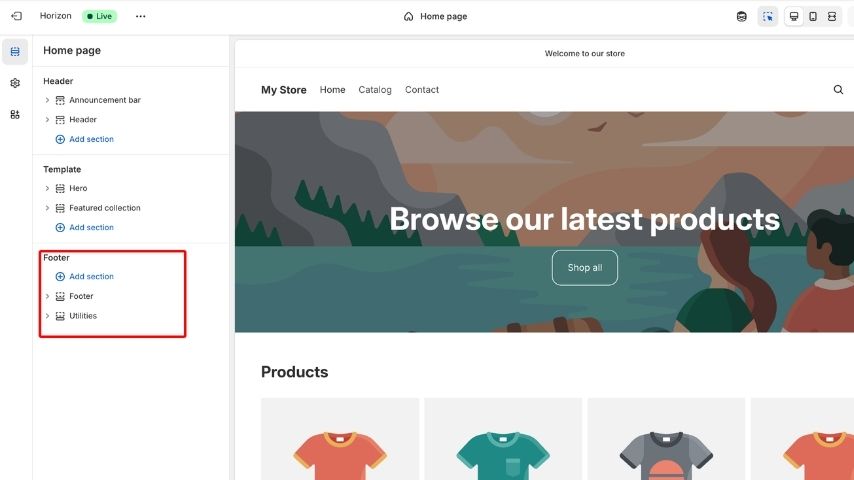
- In the editor, click Add Section.
- Choose Collection List (to show a group of categories) or Featured Collection (to show products from a specific collection directly on the homepage).
- Select which collections to show.
This is perfect for showcasing "New Arrivals," "Trending Categories," or campaign specific highlights immediately when a user lands on your site.
3. Add Collections to Your Landing Pages
If you are building SEO optimized landing pages or custom marketing pages for ads:
- Edit the page in the theme editor.
- Insert a Collection List block.
- Choose the collections to feature.
This strategy allows you to create theme based or intent based shopping paths, such as a page dedicated entirely to "Outdoor Activities" featuring multiple related collections.
4. Use Built In Theme Sections
Most modern Shopify themes offer specialized sections designed to highlight collections. Look for options like:
- Category Grids: Visual blocks representing different collections.
- Featured Product Rows: Scrolling carousels of products from a specific collection.
- Promotional Collection Banners: Large images with text overlay linking to a collection.
Use these strategically to guide shoppers toward high value products or categories.
Tips and Tricks for Creating High Converting Shopify Collection Pages
1. Craft Short, Persuasive Descriptions
The description of your collection gives the first impression to visitors. Keep it clear and benefit-focused. Use keywords naturally to help SEO and inform shoppers without overwhelming them. A concise and persuasive description encourages customers to explore your products.
2. Use High-Quality, Cohesive Visuals
High-quality images attract attention and build trust. Keep all visuals consistent in style and size. Use a mix of product shots and lifestyle images to help shoppers visualize the products in real life.
3. Guide Customers With Smart Labels
Labels like Bestseller, Limited Stock, or New Arrival direct attention and create urgency. They leverage social proof and influence buying decisions by highlighting important products.
4. Enable Smart Filtering
Filters make it easy for customers to find products quickly. Allow filtering by price, color, size, availability, or rating. Smart filtering reduces choice fatigue and improves the chances of purchase.
5. Strengthen Your SEO Foundation
Optimize collection pages for search engines with clear titles, unique descriptions, and short readable URLs. Include internal links and fast-loading images to improve both visibility and user experience. Understanding how to create collections in Shopify helps you implement these SEO best practices effectively.
6. Add Social Proof Whenever Possible
Customer ratings, reviews, or user content build trust and authenticity. Seeing positive feedback encourages shoppers to click and buy, increasing conversions. Adding social proof is also part of learning how to create collections in Shopify properly.
7. Prioritize Mobile-Friendly Layouts
With most shoppers on mobile devices, your pages must look and work well on phones. Use one or two columns, large clear images, and easily tappable buttons for a smooth experience.
8. Keep the Collection Organized and Updated
Regularly add new products and remove outdated items. Keep images and descriptions accurate. Organized collections make browsing easier and help customers make confident purchases.
9. Highlight Key Products Strategically
Feature important products prominently using size, position, or labels. This draws attention to items that matter most and guides shoppers through the collection.
10. Test and Optimize Continuously
Monitor performance using analytics and test different layouts, images, and descriptions. Continuous optimization ensures your collection pages remain effective and drive sales.
FAQs About Shopify Collections
Here are answers to common questions regarding Shopify collections to clarify any remaining uncertainties.
How many collections can I create in Shopify?
There is practically no limit. You are free to build as many collections as your catalog requires to organize your products effectively.
Can Shopify collections help with SEO?
Yes, absolutely. Well structured collections strengthen your site’s architecture. They improve internal linking and allow you to target broader keywords than product pages alone, expanding your search reach.
Can one product appear in multiple collections?
Absolutely. Shopify allows complete flexibility in how you group products. A specific pair of sneakers can appear in "Men's Shoes," "New Arrivals," "Running Gear," and "Summer Sale" simultaneously.
What’s the difference between manual and automated collections?
Manual collections are hand curated and static; the product list only changes if you change it. Automated collections populate dynamically based on rules (tags, price, etc.) that you define.
Can I hide a collection?
Yes. You can create a collection but choose not to link it in the navigation, or you can disable its visibility in your theme settings. You can also schedule collections to become visible at a future date.
Conclusion
Mastering how to create collections in Shopify goes far beyond simply learning where the buttons are in the admin panel. It is about architecting a store that feels intuitive, organized, and deeply aligned with the psychology of how customers shop.
A collection is the roadmap you provide to your customers. When structured thoughtfully with clear titles, engaging descriptions, high quality visuals, and smart filtering collections become powerful assets. They enhance the user experience by reducing frustration, they improve your SEO by creating structured content, and ultimately, they fuel conversions by guiding shoppers to the right products at the right time.
Whether you are building a brand new store from scratch or refining an established catalog with thousands of SKUs, taking the time to optimize your collection pages is one of the most impactful improvements you can make for your ecommerce business.




.jpg)
.jpg)